Takeout POS System
Running a takeout means juggling counter orders, phone orders, and delivery drivers waiting at the door, all at once, often during the busiest hour of the week. A takeout POS system needs to keep up with that pace without slowing your team down or confusing new staff halfway through a Friday night rush.
Epos Free is a free browser based POS system built with takeout restaurants in mind. Takeout is the default service type, so every new order starts in the right place, and you can still switch to eat in when someone wants to sit down. There is a free demo on the home page you can try right now with no signup, and you can sign in later to save your own menu, order history, and reporting.
Built for counter orders and phone orders
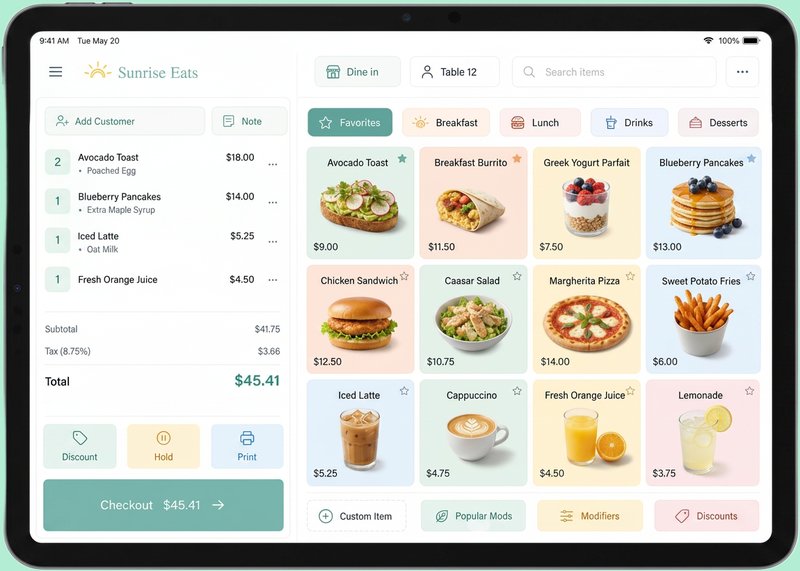
A takeout POS system has to cope with two very different order types landing at the same time: a line at the counter, and the phone ringing off the hook. Epos Free lets staff take an order at the register while a phone order is being keyed in on another device, since it works on any device with a browser, whether that is a tablet by the fryer or a laptop in the back office.
Because there is no hardware lock in, you are not tied to a single proprietary terminal. Any device with a browser can run the register, which is useful when you want a second screen at busy times or a backup device if one goes down.
Customer names on tickets, not just numbers
Shouting out order numbers works fine in some settings, but many takeout restaurants prefer to call out a customer name, especially for phone orders where the customer is not standing at the counter. Epos Free supports an optional customer name on each order, so staff can call out "Chicken and fries for Dave" instead of a number nobody remembers.
The customer name field is optional, so quick counter orders do not need to slow down to collect it, while phone orders can use it as standard.
Takeout as the default, table numbers when you need them
Most takeout orders are eat in or takeout, and takeout is the default service type in Epos Free, matching how most takeout restaurants actually operate. If a customer does want to eat in, staff can switch the order type and add an optional table number, so the same POS software copes with both without extra apps or separate systems.
Extras and meal upgrades without slowing down the line
Extra cheese, no onions, upgrade to a meal, add a drink: these small additions matter for both the customer experience and your average order value. Epos Free supports optional extras and modifiers on products, so staff can add them in a couple of taps rather than trying to remember to write them on a paper ticket.
Because extras are built into the order at the point of sale, they also show up properly in your reporting, so you can see which add-ons and upgrades are actually selling.
Coping with a busy Friday night
Friday and Saturday nights are when a takeout POS system earns its keep. Orders need to be rung in fast, extras need to be added without fuss, and the register should not freeze up or lag when three staff members are using it at once from different devices.
Epos Free runs in the browser rather than on locked down proprietary hardware, so if a device is struggling or a screen goes down mid rush, you can open the register on another device with a browser and carry on taking orders.
Voids and correcting mistakes
Mistakes happen during a rush, whether that is a wrong item rung in or a customer changing their mind. Epos Free supports voiding orders, so staff can correct an order without leaving a mess in your daily figures or having to explain a phantom sale at the end of the night.
Revenue reporting for a takeout
Knowing how your takeout performed on a given night, or across a week, matters for staffing and stock decisions. Epos Free includes reporting on daily revenue, average order value, and your most popular products, so you can see at a glance whether Friday's fish and fries outsold the tacos, and whether your average order value is creeping up or down.
The system also tracks new versus returning customer trends, which is useful for a takeout trying to understand how much repeat business it is building versus one off passing trade.
One menu, published for staff
Once your menu is set up in Epos Free, you can publish it to a shareable staff URL. That means new staff, or staff covering a shift at short notice, can look up the menu, extras, and prices from their own phone or a browser without you having to print anything out.
Payment methods for a takeout counter
Epos Free supports Cash, Card, Contactless, and Gift card payment methods, covering the ways most takeout customers actually want to pay, whether that is a contactless tap at the counter or cash for a regular who always pays that way.
Takeout POS system comparison
| Feature | Epos Free | Typical paid takeout POS |
|---|---|---|
| Cost to try | Free browser demo, no signup | Pricing varies, check their site |
| Default service type | Takeout, switchable to eat in | Varies by provider |
| Customer name on order | Optional, built in | Varies by provider |
| Hardware lock in | None, works on any device with a browser | Often tied to specific terminals |
| Extras and modifiers | Included | Often included, sometimes extra cost |
| Menu sharing with staff | Shareable staff URL | Varies by provider |
A simple takeout POS checklist
Before opening, check that every popular item is visible, every price is current, and every extra has a clear name. A takeout POS system works best when the first screen reflects the decisions customers make most often. If staff have to search for a meal upgrade or a common drink, the line grows and the chance of an incorrect order rises.
Run one sample counter order and one sample phone order before a busy shift. Add a customer name to the phone order, test an extra, choose a payment method, and confirm the completed order appears in the history. If the business offers a small eat in area, also test switching from the default takeout option to eat in and entering a table number.
At the end of the shift, use the reporting view to review daily revenue, average order value and popular products. Compare the result with what the team expected, then note any menu item that caused confusion. Small changes to names, categories and extras can make the next service smoother without replacing the whole system or buying new hardware.
- Keep the most frequently ordered items at the top of the relevant category
- Use customer names for phone orders when several orders are waiting
- Test extras and meal upgrades before the busiest service begins
- Review voided orders so training issues can be corrected rather than repeated
- Share the published staff menu URL with new or temporary team members
Frequently asked questions
What is a takeout POS system?
A takeout POS system is POS software designed to handle counter and phone orders for takeout businesses, usually including features such as customer names on orders, extras and modifiers, and reporting on sales and popular products.
Is there a free POS system for takeout restaurants?
Yes, Epos Free offers a free browser based demo on its home page that anyone can try with no signup, and you can sign in afterwards to save your own menu and order history.
Can a takeout POS system handle both eat in and takeout orders?
Yes, Epos Free sets takeout as the default service type but lets staff switch an order to eat in and add an optional table number, so one system covers both without extra software.
Does the register support customer names instead of order numbers?
Yes, Epos Free allows an optional customer name to be added to any order, which is useful for calling out phone orders by name rather than by number.
Can I add extras like extra cheese or a meal upgrade?
Yes, Epos Free supports optional extras and modifiers on products, so staff can add upgrades and extras at the point of sale in a few taps.
What happens if I need to void an order?
Epos Free lets staff void orders directly in the system, so mistakes made during a busy service can be corrected without affecting your revenue reporting.
What payment methods does the system support?
Epos Free supports Cash, Card, Contactless, and Gift card payments, covering the most common ways takeout customers pay.
Does the system work on the hardware I already own?
Yes, Epos Free works on any device with a browser, so there is no hardware lock in and no requirement to buy specific proprietary terminals.
How can I share the menu with my staff?
Epos Free lets you publish your menu to a shareable staff URL, so staff can view current items, extras, and prices from any browser without needing a printed copy.
What reporting is available for a takeout?
Epos Free provides reporting on daily revenue, average order value, popular products, and trends in new versus returning customers, giving takeout owners a clear view of trading performance.