A Loyverse Alternative: Epos Free's Browser Based POS
Loyverse has built a loyal following among small shops, cafes and takeout restaurants thanks to its free core POS app. If you are comparing free POS app alternatives, it is worth understanding both what free POS apps generally offer and where they can hit limits as a business grows.
This page looks at the general appeal of free POS apps, common limitations owners run into, and how a browser based POS like Epos Free compares. We are not aware of Loyverse's current pricing structure for any paid add ons, and this can change, so please check Loyverse's own site for up to date details.
Why free POS apps like Loyverse are appealing
It is easy to see why a free point of sale app appeals to independent cafes, small shops and market traders. There is no upfront software cost, the core app usually covers the essentials of taking an order and recording a sale, and getting started often takes only a short setup process.
For a very small operation with modest needs, this can be exactly right. The trouble tends to appear as a business grows, adds staff, or wants deeper reporting and menu features.
Common limitations of app based free POS systems
Free POS apps, including Loyverse and similar products, commonly share some limitations that are worth knowing about before you build your workflow around one.
- App installs required: many free POS apps need to be downloaded and installed on a specific device, which can make it harder to quickly add a new POS or switch devices during service.
- Device dependence: some data or settings can be tied to the device the app was installed on, which matters if a device is lost, replaced or runs out of battery mid shift.
- Paid add ons for deeper reporting: advanced reporting, multiple store management or more detailed analytics are often reserved for paid tiers on free POS apps, so the free plan may only cover basics.
- Paid add ons for employee management: staff accounts, permissions and time tracking are frequently gated behind a paid upgrade rather than included in the free tier.
- Offline first design trade offs: apps built for offline use can be great for patchy connections, but syncing across devices and staff can sometimes be less seamless than a system built to be accessed from any browser.
How a browser based POS compares
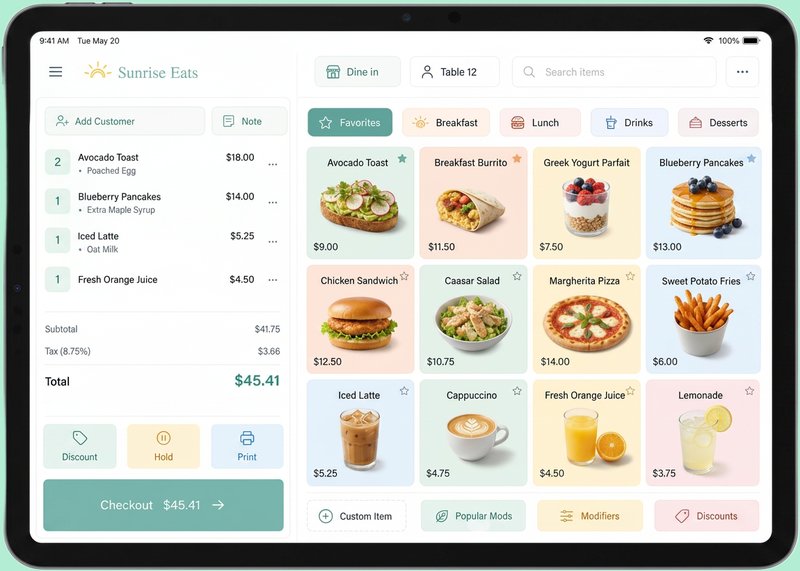
Epos Free takes a different technical approach to Loyverse. Rather than installing an app on a specific device, Epos Free runs entirely in a web browser, on any device that has one. There is nothing to download and no dedicated hardware to buy.
You can try the full demo POS on the Epos Free home page with no signup at all, so you can see exactly how it handles orders, menus and payments before deciding whether to commit to anything. Signing in afterwards lets you save your own menu and unlock reporting features.
What signing in to Epos Free unlocks
- Your own saved menu, including optional extras and modifiers per item.
- Full order history, including a record of voided orders.
- Daily revenue and average order value reporting.
- Popular products and new versus returning customer trend data.
- Eat in or takeout order types, with takeout as the default and an optional table number for eat in orders.
- An optional customer name field on each order.
- The ability to publish your menu to a shareable staff URL so your whole team can access it from any device browser.
Factual comparison: Loyverse versus Epos Free
| Feature | Loyverse (general) | Epos Free |
|---|---|---|
| Access method | Dedicated app install on supported devices | Runs in any browser, no install required |
| Pricing for core POS | Free core app, add ons vary, check their site | Free browser based POS, demo needs no signup |
| Advanced reporting | Often a paid add on, check their site | Daily revenue, average order value, popular products and customer trends included |
| Employee management | Often a paid add on, check their site | Not the current focus, built around a straightforward single or shared POS workflow |
| Menu sharing with staff | Varies, check their site | Publish your menu to a shareable staff URL |
| Hardware requirements | Runs on supported devices per app requirements | Works on any device with a browser, no hardware lock in |
| Payment types recorded | Varies, check their site | Cash, card, contactless and gift card |
Data ownership and where your information lives
When choosing between a free app based POS and a browser based POS, it is worth thinking about where your data actually sits and how easily you can access it. With an app installed on a device, some data and settings can be more closely tied to that specific device or account setup.
Epos Free is built around signing in to save your menu and view your order history and reporting, meaning your information is tied to your account rather than to one physical device. This also makes it straightforward to check daily revenue, average order value or customer trends from any device browser, without needing the register itself to hand.
Migration steps if you are moving from Loyverse
Moving away from an existing POS system is a practical project. Here is a sensible order to work through it.
- List your current menu items, prices, and any optional extras or modifiers you offer, so you can rebuild the same structure elsewhere.
- Check whether you are on any Loyverse paid add ons and note their renewal dates before cancelling anything.
- Try the Epos Free home page demo with no signup to get familiar with the interface and workflow.
- Sign in and set up your saved menu, including extras and modifiers, matching your existing pricing.
- Decide on your default order type and whether table numbers are relevant for eat in orders at your venue.
- Publish your menu to a shareable staff URL and share it with your team ahead of a live shift.
- Run the new POS alongside your old process for a quiet shift first, checking daily revenue and average order value figures match what you expect.
- Fully switch over once your team is comfortable, keeping an eye on order history and voided orders in the first week.
Who should probably stay with Loyverse
To keep this comparison fair, some businesses are well served staying with Loyverse. If you rely on a specific integration, dedicated hardware peripheral, or offline first functionality that Loyverse supports well, and you have already invested time setting up staff accounts and inventory within it, switching may not be worth the disruption.
Retailers with complex stock and inventory tracking needs in particular may find Loyverse's retail focused features, where applicable, better suited than a hospitality focused browser register.
Who tends to benefit from switching to a browser based POS
Epos Free tends to suit cafes, takeout restaurants, restaurants and bars that want a simple, no cost register without installing an app on a dedicated device, and that value being able to check reporting or update the menu from any device with a browser.
It also suits venues that want to avoid paid add ons for basics like reporting, since features such as daily revenue, average order value, popular products and customer trends are included when you sign in, rather than reserved for a higher tier.
Final thoughts on choosing between Loyverse and Epos Free
Both approaches have their place. Loyverse's app based model works well for businesses that want a dedicated device set up once and left largely as is, particularly where offline reliability matters most. Epos Free's browser based model works well for businesses that value flexibility across devices, simple reporting included as standard, and no signup needed just to try it out.
The best way to decide is to try both. The Epos Free demo takes only a few minutes with no signup, so you can compare it directly against your current Loyverse setup before making any changes.
Frequently asked questions
What is a good free alternative to Loyverse?
Epos Free is a free, browser based POS that can serve as an alternative to Loyverse, offering a home page demo with no signup and the option to sign in for saved menus and reporting.
Do I need to install an app to use Epos Free like I do with Loyverse?
No, Epos Free runs entirely in a web browser on any device, so there is nothing to download or install, unlike app based systems that require installation on a specific device.
Is reporting included free with Epos Free?
Yes, signing in to Epos Free includes daily revenue, average order value, popular products and new versus returning customer trends as standard, with no separate paid add on required.
Does Epos Free support optional extras or modifiers like Loyverse?
Yes, you can add optional extras and modifiers to menu items after signing in and saving your own menu on Epos Free.
Can my staff access the menu without installing anything?
Yes, Epos Free lets you publish your menu to a shareable staff URL, which any team member can open in a browser on their own device without installing an app.
Does Epos Free work offline like some Loyverse setups?
Epos Free is designed to work in any device browser rather than as an offline first app, so an internet connection is needed to use it, which is worth considering if your venue has unreliable connectivity.
What payment types can I record in Epos Free?
Epos Free lets you record payments made by cash, card, contactless or gift card against each order.
Is Loyverse better for retail businesses with complex stock needs?
Loyverse offers retail focused features in some areas that may suit businesses with complex stock and inventory tracking needs, so those businesses may prefer to check Loyverse's site directly rather than switch.
How do I move my menu from Loyverse to Epos Free?
List your existing menu items, prices and modifiers from Loyverse, then recreate them by signing in to Epos Free and building your saved menu, before testing it during a quiet shift ahead of full rollout.
Does Epos Free charge for employee management features the way some Loyverse add ons do?
Epos Free is built around a straightforward POS workflow with saved menus, order history and reporting included free when you sign in, and does not currently focus on separate paid employee management add ons.