Free POS System for US Hospitality
A free POS system US owners can actually use, not just a trial that expires, is harder to find than it should be. Epos Free is a browser based POS system built for cafes, restaurants, takeout restaurants and bars that want proper POS software without a monthly bill.
This page explains what free really means with Epos Free, who it suits, what is included, how quickly you can set it up, the realistic limits of any free POS system, and how it compares with paid POS software so you can decide with your eyes open.
What Free Actually Means with Epos Free
Free means you can open Epos Free in a browser right now and use a working POS demo with no signup and no card details. That is the fastest way to see whether a free POS system suits your service style before you commit any time to it.
When you are ready to keep your own data, you sign in for free to save your menu, keep order history, and use the reporting tools. There is no hidden countdown, no forced upgrade screen, and no requirement to buy hardware from us.
- Free browser demo, no signup needed to try it
- Free sign in to save your own menu and orders
- No hardware lock in, works on devices you already own
- No card details required to start
Who a Free POS system Suits
A free POS system suits independent cafes, small restaurants, takeout restaurants and pubs or bars that want proper order taking, menu management and daily reporting without paying a subscription for it. It also suits anyone opening a new site who wants to test workflows before investing in a paid platform.
It is a strong fit for owner operators who run their own register, staff who need a simple shareable menu, and businesses that already own tablets, laptops or phones and do not want to buy dedicated terminals.
- Independent cafes and coffee shops
- Small restaurants and bistros
- Takeout restaurants, with takeout set as the default order type
- Pubs and bars needing quick, simple order entry
- New businesses testing their menu and workflow before launch
What Epos Free Includes
Epos Free covers the day to day essentials a small hospitality business needs from POS software, without charging extra for features that should be standard.
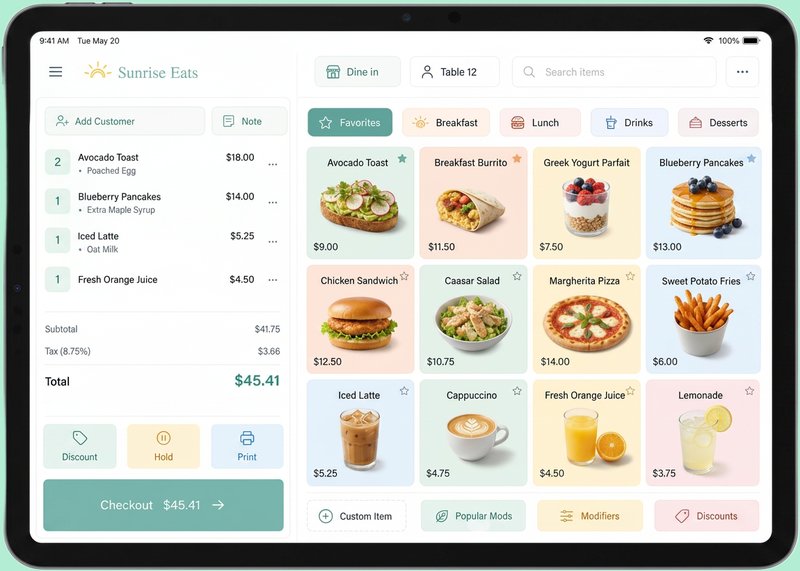
- Menu builder with optional extras and modifiers
- Eat in or takeout order types, with a table number when eat in is selected
- Optional customer name on orders
- Payment methods for cash, card, contactless and gift card
- Order history and the ability to void orders
- Daily revenue and average order value reporting
- Popular products and new versus returning customer trends
- Publish your menu to a shareable staff URL
Setup in Minutes, Not Weeks
Because Epos Free runs in a browser, there is no software to install and no terminal to configure out of the box. You open the site, try the demo, build your menu, and publish it to a staff URL that your team can use straight away.
A typical setup is adding your products and prices, setting any optional extras, choosing which items default to eat in or takeout, and sharing the menu link with your POS devices. Most small menus can be entered in well under an hour.
Hardware You Already Own
Epos Free is built to work on any device with a browser, so there is no obligation to buy specific terminals, card readers, or printers to get started. A tablet, laptop or even a phone behind the counter can run the register.
This matters for a genuinely free POS system, because many providers advertise free software while requiring you to buy their hardware. Epos Free avoids that lock in, so the only kit you need is whatever you already have plus your own card payment terminal for taking contactless and card payments.
The Realistic Limits of Free POS Systems
Being fair about limitations matters more than overselling a free product. Free POS systems, including Epos Free, are generally aimed at single site, straightforward operations rather than large multi branch chains with complex stock and payroll integrations.
If your business needs deep third party integrations, dedicated account management, or very advanced inventory and supplier ordering, you should weigh that against what a free platform offers before deciding. Always check the specific feature set of any provider, including Epos Free, against your own requirements.
- Best suited to single site or small multi site operations
- Advanced stock and supplier management may need a specialist tool
- Check any provider's current feature list before switching, since features change over time
Migrating to a Free POS System
Moving from a paper register, an old cash register, or a paid POS system usually comes down to three steps: recreate your menu with prices and extras, decide your default order type and table number approach, and publish the menu to your staff URL for the team to use.
Because there is no hardware to swap out with Epos Free, migration is mostly about data entry rather than installation. Running the free system alongside your existing POS for a short trial period is a sensible way to check it fits your service before fully switching over.
Security and Data Ownership
Signing in to Epos Free lets you save your own menu and order history under your own account, rather than leaving your data on a shared or public demo. That separation between the open demo and your signed in account is there so you control what is saved.
As with any online POS software, use a strong password for your account and be mindful of who has access to shared devices running your staff menu URL.
Free vs Paid POS Systems Compared
Pricing for paid POS systems varies by provider, contract length and hardware bundle, so always check a provider's own site for current figures. The table below compares typical characteristics rather than exact costs.
| Feature | Epos Free | Typical Paid POS |
|---|---|---|
| Monthly cost | Free | Subscription, pricing varies by provider |
| Setup | Browser based, minutes to configure | Often involves onboarding calls or installation |
| Hardware | Use devices you already own | Sometimes tied to specific terminals |
| Menu and extras | Included | Usually included, may sit behind a plan tier |
| Reporting | Revenue, average order value, popular products, customer trends | Varies, advanced reporting sometimes a paid add on |
| Contract | None | Often a minimum term contract |
Choosing Between Free and Paid
If your business is a single site with a straightforward menu and you want to avoid a monthly bill, a free POS system like Epos Free is a sensible starting point. If you need extensive integrations with accounting, payroll or complex stock systems across multiple branches, compare that specific need against paid providers, checking their sites for current pricing and features.
Many businesses start on a free POS system and only move to paid software once growth genuinely demands features that a free plan does not cover, rather than paying from day one for capability they do not yet need.
Frequently asked questions
Is Epos Free actually free to use?
Yes, Epos Free offers a browser based demo with no signup required, and free sign in to save your own menu, order history and reports. There is no hidden trial period or forced payment to keep using the core POS features.
Do I need to buy hardware to use a free POS system?
No, Epos Free works on any device with a browser, including tablets, laptops and phones you already own, so there is no requirement to buy dedicated terminals or accept hardware lock in.
What payment methods does Epos Free support?
Epos Free supports cash, card, contactless and gift card payment methods, which are recorded against each order for accurate daily revenue reporting.
Can I use Epos Free for takeout orders?
Yes, takeout is the default order type in Epos Free, and you can switch an order to eat in with an optional table number when needed.
What reporting is included in the free plan?
Epos Free includes daily revenue, average order value, popular products, and new versus returning customer trends, all available once you sign in and save your menu.
Is a free POS system suitable for a growing multi site business?
A free POS system like Epos Free suits single site or small operations well, but larger multi site businesses with complex integration needs should compare their specific requirements against paid providers before deciding.
How long does it take to set up a free POS system?
Most small menus can be built and published to a shareable staff URL in under an hour, since Epos Free requires no software installation and runs directly in a browser.
Is my data safe if I sign in to a free POS system?
Signing in to Epos Free keeps your menu and order history under your own account rather than on the open public demo, so using a strong password and controlling device access is the main safeguard, as with any online POS software.
How does a free POS system compare with a paid one on cost?
Epos Free has no monthly subscription, while paid POS systems typically charge a recurring fee that varies by provider and contract, so it is worth checking each provider's own site for current pricing before comparing.
Can I publish my menu for staff to use on Epos Free?
Yes, Epos Free allows you to publish your menu to a shareable staff URL that your team can access on any device with a browser.